


Mocly: Online Video Chat
4.9118.00 Reviews
App Specs
- Version
- 1.0.6
- Updated On
- License
- Free
- Downloads
- 50,000+
- Developer
- RED Studio
- Categories
- Lifestyle
- Platform
- Android
Screenshots



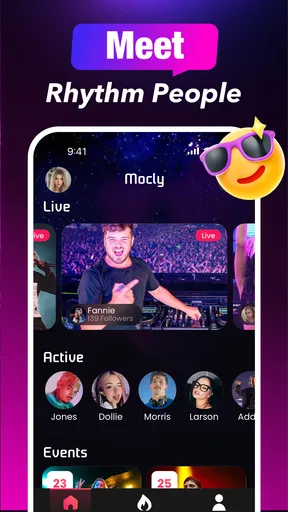
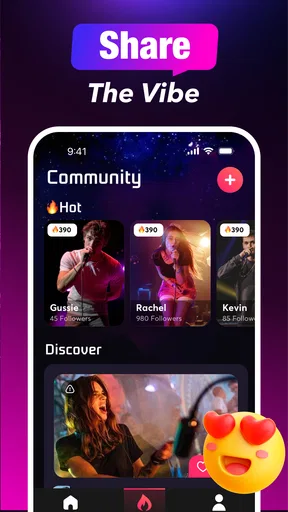
 Analysis by AppCompare
When I open a video-chat app for the first time, I want to know two things quickly: what kind of interaction it is built around, and how much effort it takes to get to a worthwhile conversation. Mocly: Online Video Chat is aimed at people who enjoy meeting unfamiliar people rather than messaging only friends they already know. Its mix of social discovery, battles, and calls gives it a livelier feel than a basic one-to-one chat tool, though that also makes it less suited to anyone who wants a quiet, predictable way to keep in touch.
I’d approach it as a place to try short conversations and see whether the social format suits me, not as a guaranteed way to find a lasting connection. With strangers, the quality of a session depends on who is available, what both people feel like discussing, and whether the connection holds up. Keeping that expectation realistic makes the first session feel more relaxed: a pleasant conversation is a win, while an awkward match is simply a reason to move on.
What to expect from a social video-chat app
The app’s focus on meeting people and joining calls puts it in a different lane from messaging apps built around contacts, group chats, and ongoing threads. I would choose Mocly when I’m curious about spontaneous interaction; I’d choose a familiar messenger when I need to reach a particular person or reliably return to a conversation. That distinction matters before installing, because a discovery-oriented app is only useful if you’re comfortable with the uncertainty of talking to someone new.
The battles element also signals that this isn’t only about calm conversation. It suggests a more playful, competitive social atmosphere, which may be appealing if you like interaction with a bit of energy. If you prefer a private, low-pressure call with someone you already know, the usual video-calling option on your phone is likely a better fit. I’d decide based on the kind of social moment I want, rather than expecting one app to cover both needs equally well.
There is a useful trade-off here: spontaneous discovery can make a free moment more interesting, but it doesn’t give you the control of arranging a call with a friend. I’d use it when I have time to browse and patience for a conversation to develop, not when I have only a minute to pass on important information. That small choice about timing can make the experience feel intentional rather than like a gamble with my attention.
Getting started without overthinking it
On first opening the app, I’d keep setup simple and take each prompt as it appears instead of trying to configure everything in one go. The goal is to reach the first useful interaction, not to make a perfect profile or commit to a long session before knowing how the app feels. If a screen asks for a choice I don’t understand, I’d pause and read it rather than tapping through just to get moving.
For a first attempt, I’d also make the surroundings part of the setup. A stable internet connection, a reasonably quiet spot, and enough light to be seen clearly are small practical advantages for a live video conversation. They won’t guarantee a great match, but they remove avoidable distractions and make it easier to tell whether a problem is with the connection or simply with the conversation.
Worth Reading Before You Choose

EA SPORTS FC Mobile 26 Is a Bigger Football Game, but It Takes Time

Flipboard Shows What News Apps Must Do Beyond the Feed

Switching to Android Auto Means Rethinking Your Driving Routine

Google Calendar Makes a Crowded Week Easier to Manage

Ludo King Makes the Most of the Minutes Between Plans

Baby Panda World Brings Quick Play to Modern Phones, but Its Game Library Feels Busy
Because this is a social app for meeting people, I’d set a personal boundary before starting: how long I want to spend, and what information I’m not comfortable sharing. I don’t need to give a stranger identifying details to make a conversation friendly. Keeping the first chat to ordinary interests and light topics is a sensible way to learn the rhythm of the app while staying in control of what I reveal.
Finding a first successful conversation
My best advice for a first session is to begin with an easy, open question rather than waiting for the other person to carry everything. Asking what they enjoy doing in their free time gives the conversation room to go somewhere without demanding personal details. If the other person seems uninterested, I wouldn’t treat that as a verdict on the app or on myself; strangers don’t always share the same mood or conversational style.
A realistic use case is a quiet evening when I have ten or fifteen minutes free and want a little social variety without organizing plans. I’d start a session, offer a friendly greeting, and see whether a shared topic appears. If it does, I can enjoy the exchange; if it doesn’t, ending the attempt and trying another time is a better use of my evening than forcing a conversation that feels uncomfortable.
For a smoother first call, I’d avoid multitasking. Watching another screen or moving between noisy rooms makes it harder to listen and can make a brief conversation feel more awkward than it needs to. Giving the interaction a few undistracted minutes is a small but useful test: it helps me judge the social experience itself, not just the conditions I created around it.
What can feel unclear at first
Random social discovery and planned calls serve different purposes, and it can take a moment to understand which kind of interaction I’m entering. Before starting, I’d check the wording on the button or screen and make sure I know whether I’m beginning a spontaneous encounter or joining another kind of activity. That brief pause is especially worthwhile if I’m in a public place or don’t want to appear on camera unexpectedly.
It also helps to distinguish a technical interruption from a poor match. A frozen image or delayed response can spoil the flow, while a conversation that simply runs out of things to say is a social mismatch. If the video quality becomes distracting, I’d first check my own connection and location before deciding the whole service is unreliable. If the exchange feels wrong for personal reasons, though, I’d stop rather than trying to troubleshoot my way through it.
Social apps can create uncertainty around what to share and how to respond when someone crosses a line. I’d keep personal contact details, precise location information, and other identifying details private, especially in an initial conversation. The original experience described blocking and reporting controls, which are useful options to know about; I’d look for them before a problem arises so I’m not searching for a safety control while feeling uncomfortable.
Who is likely to enjoy it—and who may not
I think Mocly is most appealing to adults and older teens who are comfortable with live interaction and curious about meeting people outside their existing circle. It can suit someone who wants a spontaneous social break, enjoys playful competition, or is happy to let a conversation unfold without a fixed agenda. It is less compelling for people who mainly want dependable calls with family, a searchable archive of important conversations, or a carefully curated professional network.
The app is free to download, with optional in-app purchases listed from $0.99 to $99.99 per item. I’d treat those purchases as optional rather than a necessary part of deciding whether the basic experience is for me. Before buying anything, I’d check what the specific item offers and whether I actually want it; a wide price range is a good reason not to tap through a purchase screen casually.
Age is another practical consideration. Mocly carries a Teen content rating, but that doesn’t mean every stranger interaction is automatically appropriate for every young person. I’d encourage a teen to use judgment, keep personal information private, and talk with a trusted adult about online boundaries. Someone looking for a tightly controlled environment for younger children should choose a service designed specifically for that purpose instead.
As a Lifestyle app from RED Studio, Mocly is built around social use rather than productivity or a specific hobby. It has a 4.7 average from around 200 ratings, while its review count is much smaller. I’d read that as a positive sign of user response, not proof that every session will be smooth or that it will suit every personality. The app has over 10,000 installs, enough to suggest an active audience, but the experience still depends on the people available when I open it.
Connecting the World One Chat at a Time
First thing’s first, Mocly is all about making those connections. You know how sometimes you just want to chat with someone new, maybe from a country you’ve always dreamed of visiting? Well, this app is like your personal passport to a diverse world of conversations.
Setting up was super simple. I just downloaded the app, signed up, and boom – I was ready to mingle. What I found pretty neat was how intuitive the interface is. Even if tech isn’t your strong suit, you’ll find navigating around a breeze.
Features That Stand Out
Now, let’s talk features because this app packs a punch. One feature that caught my eye was the random video chat. It’s like rolling the dice on who you’ll meet next – kind of exciting, right? You never know who you’ll end up chatting with, and that element of surprise is pretty thrilling.
Then there’s the language translation feature. Imagine chatting with someone who speaks a completely different language – and actually understanding them! Mocly makes it happen with real-time translations, making those cross-cultural exchanges smooth and enjoyable.
Another thing I appreciated was the safety measures in place. The app takes privacy seriously, and there are options to block or report any unsavory behavior. It’s good to know that I can chat freely without worrying about unwanted interactions.
My Experience Using Mocly
Alright, let’s get personal. I spent a good chunk of my weekend exploring what Mocly: Online Video Chat had to offer, and I have to say, I was pleasantly surprised. I ended up chatting with a student from Tokyo who shared his love for anime and a chef from Italy who gave me the inside scoop on making the perfect pasta. These interactions were not only fun but also enriching – I learned something new from each person!
Of course, like any app, there are moments when connections might lag, especially if your internet isn’t top-notch. But honestly, that’s a minor hiccup compared to the overall experience.
Wrapping Things Up
So, would I recommend Mocly? Absolutely! If you’re looking to expand your social circle and have a penchant for meeting intriguing people from all over the world, this app is definitely worth a shot. It’s user-friendly, packed with useful features, and, most importantly, it opens up a world of possibilities right from your phone.
If you’re intrigued and ready to start your own adventure, check out the download links on our site. Who knows, your next best friend could be just a video chat away!
A few practical details before installing
The app is free, and its current version is 1.0.5. It was released on November 17, 2025, and requires Android 7.0 or later. Those details make it easier to decide whether it fits your device, but I’d still leave room for ordinary app updates and check that the version available on your platform is compatible before relying on it for a planned call.
One question a first-time user may have is whether the app is for scheduled conversations or spontaneous ones. Its emphasis on discovery makes it feel better suited to opening the app when I’m ready to meet someone than arranging a dependable appointment with a specific person. For a planned call, I’d still reach for a service where both participants already know how to connect and when to expect each other.
Another question is whether translation removes every language barrier. I’d treat it as a helpful aid, not a substitute for patience or clear communication. Short sentences, familiar words, and checking that the other person understood are useful habits in any cross-language chat. Translation can make an exchange more accessible, but humor, slang, and cultural context can still be easy to misread.
Finally, I’d think of the first session as a low-stakes trial rather than a commitment. The useful test is whether I enjoy the pace, feel comfortable with the way strangers interact, and can find a conversation that holds my interest. If those things line up, Mocly can be a fun addition to a social routine; if they don’t, a conventional messenger or a video-call app for known contacts will probably serve me better.
Pros
- User-friendly interface for seamless navigation.
- High-quality video and audio streaming.
- Diverse community from around the globe.
- Strong privacy and security features.
- Instant translation for smooth communication.
Cons
- Requires stable internet for best experience.
- Limited features in free version.
- Occasional connection drops.
- Some features behind a paywall.
- In-app ads can be intrusive.
FAQs for Mocly: Online Video Chat
What is Mocly: Online Video Chat and how does it work?
Mocly: Online Video Chat is an app designed to connect users through live video calls. It allows you to meet new people, engage in video conversations, and explore diverse cultures. The app matches you with random users or those with similar interests, providing a seamless experience for making new connections.
Is Mocly: Online Video Chat safe to use?
Mocly prioritizes user safety by implementing measures such as account verification and reporting tools. However, users should exercise caution and avoid sharing personal information with strangers. The app encourages maintaining privacy and offers blocking features to prevent unwanted interactions.
What features does Mocly: Online Video Chat offer?
Mocly provides various features such as live video chat, text messaging, and the ability to match with users based on interests. It also includes filters and effects to enhance your video experience. The app aims to make chatting fun and engaging while ensuring user security and privacy.
Are there any subscription fees or in-app purchases?
Mocly: Online Video Chat is free to download and use, but it may offer in-app purchases or subscription plans for premium features. These could include ad-free experiences, enhanced matching algorithms, or additional filters and effects. Users can choose to upgrade based on their preferences.
What are the system requirements for Mocly: Online Video Chat?
Mocly requires a stable internet connection and is compatible with both Android and iOS devices. Ensure your device is updated to the latest operating system version for optimal performance. The app may require permissions for camera, microphone, and notifications to function correctly.


